Technology

GNU on Windows (GoW) - Linux Commands on Windows

For a long time the only way to launch Linux commands in Windows was with Cygwin. But Cygwin is rather bulky and can take a long time to download if you are on a slower Internet connection. This cross-platform development challenge has made many programmers seek lightweight alternatives for Linux compatibility on Windows.

As I’ve mentioned before, I love Linux for its stability and reliability. So I was looking for a simpler way to execute Linux commands in Windows, and found it! This development environment setup is perfect for programmers who need system administration tools across different operating systems.
The Best Theme for VS Code and Visual Studio: My Top Pick

For a long time I have been a big fan of Sarah Drasner’s theme for Visual Studio Code, and even used a port of it in Visual Studio 2019 Community Edition.

Ever since I’ve started learning .Net Framework on both Linux and Windows, I ’ve also started using the default Visual Studio 2019 theme in both the IDE, and the editor. Simply because I like unity across the developer tools I use.

Here are a few screenshots:

How To Change Your GitHub Theme?

So, as you may or may not know, GitHub is testing themes for its website, and the feature is now in beta according to GitHub Docs.

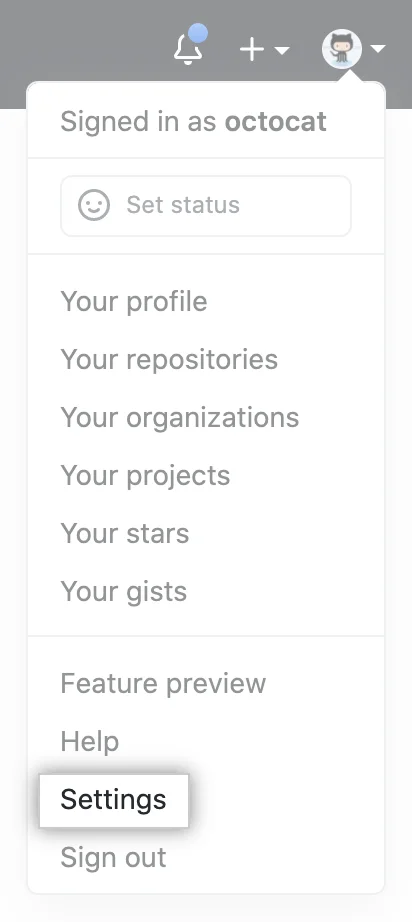
To change how your GitHub looks, you need to log in to your GitHub account, click your profile pictures, choose Settings > Appearance and on the section that opens, choose one of the three themes that are currently available.

Below are the screen shots, courtesy of GitHub Docs:

GitHub Account Settings.

GitHub Account Settings.

My Favorite VS Code Theme and How to Make Your Editor Beautiful

Visual Studio Code (or simply vscode, or even code) is an editor developed by Microsoft. The editor was released back in 2015 and by now is considered one of the best if not the best code editors for web development and software engineering out there. I admit, I used Vim for a bit, but switched back to vscode+vim plugin for better .NET development experience and modern IDE features, since I work with .Net nowadays. This powerful code editor has become essential for programming productivity and developer workflows. I am going to tell you about my favorite set of plugins in one of my next posts.