Building a Personal Portfolio with Tailwind CSS
Creating a personal portfolio website is one of the first projects most web developers tackle when learning new technologies. It’s the perfect combination of practical utility and skill demonstration—a place where you can showcase your work while practicing the tools you want to master. My latest project, a Tailwind Portfolio template, demonstrates how to build a modern, professional portfolio using Tailwind CSS with features that rival complex React or Vue implementations—all with plain HTML and JavaScript.
Why Tailwind CSS?
Tailwind CSS has revolutionized the way we approach CSS styling. Rather than writing custom CSS classes for every component, Tailwind provides a comprehensive utility-first framework that lets you build custom designs directly in your HTML. The key advantage? Zero runtime overhead and complete control over your styling without ever leaving your markup.
For a portfolio site where you want complete creative freedom while keeping things simple, Tailwind via CDN offers the perfect balance. You get all the benefits of utility classes without needing to set up Node.js, PostCSS, or any build tooling. It’s as simple as adding a script tag and start building.
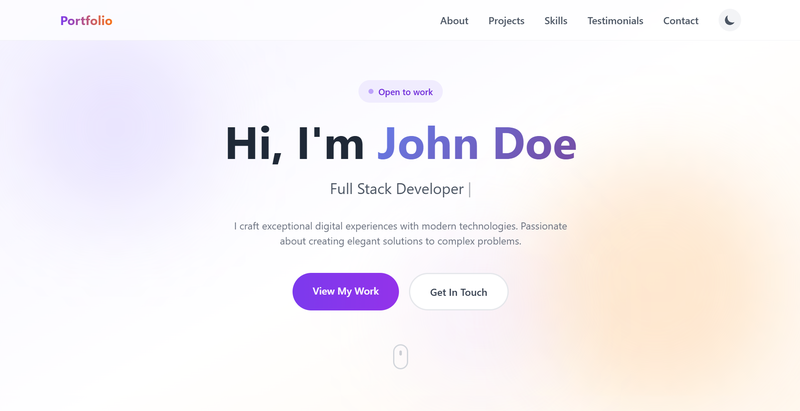
Tailwind Portfolio Homepage.
New Features in the Updated Version
The latest version of the Tailwind Portfolio template brings several modern web design features:
Dark Mode with LocalStorage Persistence
The template now includes a fully functional dark mode toggle that remembers user preference. Using localStorage, the site automatically applies the user’s preferred theme on their next visit. This is implemented with vanilla JavaScript that checks system preferences initially and allows manual toggling.
Glassmorphism Effects
Modern frosted glass effects grace the navigation bar and project cards. Using Tailwind’s backdrop-blur utility combined with semi-transparent backgrounds, the template creates depth and visual hierarchy without overwhelming the content.
Smooth Scroll-Triggered Animations
The template leverages the Intersection Observer API to trigger animations as users scroll through the page. Elements fade in, slide up, and scale into view—adding a polished, professional feel. Floating animated orbs in the background create dynamic visual interest without distracting from the content.
Animated Gradients
Gradient text and backgrounds animate smoothly, drawing attention to key areas like the hero section and section headings. The template uses Tailwind’s bg-gradient-to-r along with custom keyframe animations for these effects.
Mobile-First Responsive Design
Every section uses Tailwind’s responsive prefixes (md:, lg:) to ensure optimal layouts across all devices. A hamburger menu provides smooth mobile navigation, and all interactive elements are touch-friendly.
Project Overview
The Tailwind Portfolio template includes everything you need to present yourself professionally online:
Hero Section: Eye-catching animated background with gradient effects and a clear call-to-action button
Stats Counters: Animated counters showcasing experience years, completed projects, happy clients, and awards
About Section: Profile image display with key highlights and personal information
Tech Stack Showcase: Visual display of technologies and tools you work with
Featured Projects: Project cards with hover overlays revealing additional details and links to project pages
Skills Section: Progress bars demonstrating proficiency in various technologies
Testimonials: Client reviews with star ratings in a clean card layout
Contact Section: Contact information with integrated social media links
Project Detail Pages: Dedicated pages for showcasing individual projects in depth
Project Structure
The template keeps things straightforward with a minimal file structure:
tailwind-portfolio/
├── index.html          # Main portfolio page
├── project-one.html    # Project detail page
├── project-two.html    # Project detail page
├── project-three.html  # Project detail page
├── package.json        # NPM configuration
└── README.md           # Documentation
This simplicity makes it easy to customize. Need to add a new project? Duplicate one of the existing project pages, update the content, and you’re done.
Tailwind Techniques Used
The template demonstrates several advanced Tailwind CSS techniques:
- Custom Tailwind Configuration: Extended with custom animations for floating elements and gradient shifts
- Dark Mode Variants: Using
dark:prefix for all theme-specific styles - Glassmorphism:
backdrop-blurcombined withbg-opacityfor frosted glass effects - Group Hover:
groupandgroup-hoverclasses for coordinated hover effects across parent-child elements - Transform & Transition:
transition-all,transform,hover:scalefor smooth animations - Custom Keyframes: CSS animations for floating orbs and gradient shifts
Customization Made Easy
One of the primary goals with this template was making it accessible to developers of all skill levels. Customization requires nothing more than basic HTML knowledge:
- Personal Information: Open
index.htmland replace the placeholder name and details with your own. - Projects: Modify the project cards in the Projects section or create additional pages following the existing template.
- Skills: Update the progress bars to reflect your proficiency levels.
- Testimonials: Add or modify client testimonials with ratings.
- Contact: Replace the email and social media links with your own.
Getting Started
To run the project locally, you’ll need Node.js installed. The template uses live-server for development, which provides hot-reloading and a local server:
# Install live-server globally
npm install -g live-server

# Start the development server
live-server --port=3000
The site will be available at http://localhost:3000. Any changes you make to the HTML will automatically refresh in your browser.
Technology Stack
The project keeps dependencies to an absolute minimum:
- HTML5: Semantic markup for accessibility and SEO
- Tailwind CSS: Via CDN for rapid styling
- Vanilla JavaScript: For dark mode toggle, animations, and mobile menu
- live-server: For local development
This lean stack means faster load times, easier deployment, and fewer things that can go wrong.
Conclusion
Whether you’re a beginner learning web development or an experienced developer who wants a quick portfolio solution, this Tailwind Portfolio template offers a solid foundation. With dark mode, glassmorphism, scroll animations, and responsive design, it demonstrates how far you can go with just HTML, Tailwind CSS, and vanilla JavaScript—no complex frameworks or build tools required.
If you prefer a ready-made theme solution with built-in accessibility features, check out my Introducing Olivero Hugo Theme article for a complete Drupal-inspired design with WCAG compliance.
The source code is available on GitHub if you’d like to use it as a starting point for your own portfolio.