Tutorial

Hugo Deep Dive: Customizing and Extending the CMS

Hugo is often marketed as the “world’s fastest framework for building websites,” but speed is only half the story. The real power of Hugo lies in its flexibility. While many developers use it as a simple blog engine, it is actually a robust, data-driven content platform that can handle complex documentation, enterprise portfolios, and even headless CMS architectures.

In this deep dive, we’ll move beyond the basics of “hugo new site” and explore how to extend the engine to suit sophisticated requirements. If you haven’t yet, check out my Introducing Olivero Hugo Theme for a practical example of how these concepts come together in a production-ready theme.

Build a Portfolio Without React: A Step-by-Step Guide

Why Skip React for Your Portfolio?

If you’re a React developer, building your portfolio with React seems like a “no-brainer.” It shows you know the framework, right? Not necessarily. In 2026, the real mark of a senior developer is the ability to choose the right tool for the job, not just the one they are most comfortable with.

Reaching for a heavy JavaScript framework for a site that is essentially 90% static text and images introduces what I call the “React Tax”:

How To Delete Unused Google Profile Pictures?

Ever since Google discontinued Google+ (its social network) there’s no obvious way to delete unused profile pictures from your account. This guide will help you manage your digital identity and clean up your Google account for better online privacy.

However, there’s a workaround I’ve tested personally.

Google Profile Images.

Google Profile Images.

To delete your unused profile pictures (or any photos you might want to delete from your Google account), you have to be signed in to your google account. After you are signed in, follow this simple steps for better account management:

How To Change Your GitHub Theme?

So, as you may or may not know, GitHub is testing themes for its website, and the feature is now in beta according to GitHub Docs.

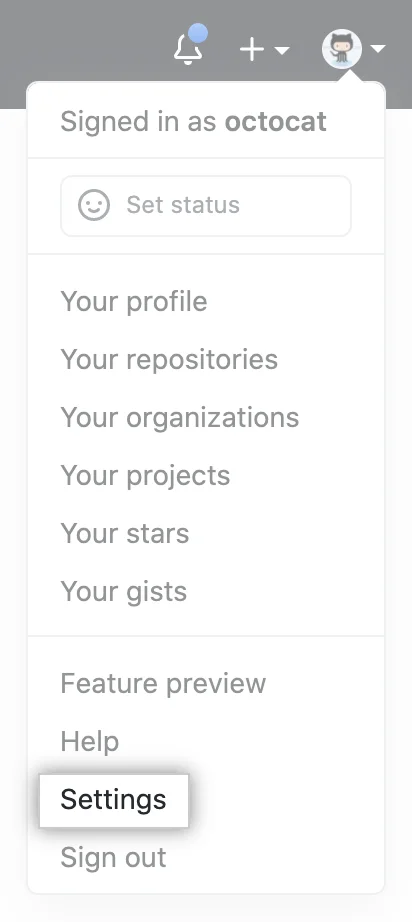
To change how your GitHub looks, you need to log in to your GitHub account, click your profile pictures, choose Settings > Appearance and on the section that opens, choose one of the three themes that are currently available.

Below are the screen shots, courtesy of GitHub Docs:

GitHub Account Settings.

GitHub Account Settings.

How To Deploy On Netlify?

The official guide on how to deploy your website to Netlify for static site hosting and continuous deployment, which can be found here, explains the required steps for modern web development workflows:

  • Step 1: Add Your New Site. Creating a new site on Netlify for your web development project is simple and perfect for software engineering teams looking for scalable cloud hosting solutions.
  • Step 2: Link to Your GitHub or GitLab repository (or supported version-control tool of choice) for automated deployments
  • Step 3: Authorize Netlify.
  • Step 4: Select Your Repo.
  • Step 5: Configure Your Settings.
  • Step 6: Build Your Site.
  • Step 7: All Done.

And it’s really as simple as that. The very blog you are exploring at the moment is deployed on Netlify too, and the website performance score is pretty great for SEO and user experience, as you can see on Test My Site: